How to find the chords of a song from the recording
Add the song to Pitband and it writes a chord chart, bar by bar, with the words underneath and the song’s key at the top. It works the chords out from the recording itself, on your Mac, so it works for songs nobody has charted yet.
How to do it
- Add the song. Drop an audio file onto the window, pick it from your Music library, or paste a YouTube or SoundCloud link.
- Give it a few minutes. Pitband separates the band, finds the beat and the bar lines, and works out the chords, the key and the sections. A song takes a few minutes.
- Open Chords. The chart lays the song out by section (verse, chorus, bridge), bar by bar, with the lyrics under the chords where they are sung.
- Play along slowly. Press play, drop the speed to 75% and strum along. The bar being played lights up, so you never lose your place.
- Fix anything that sounds wrong. Switch on Fix chords, click the chord, and type what you hear.
What the chart shows
- Every bar, numbered. Chords sit where they change inside the bar, not only on the first beat, and “N.C.” marks a bar where nobody plays a chord.
- The words. Lyrics run under the chords, so you can see which word the change lands on. Turn them off for a chords-only chart.
- Three ways to write a chord. Chord names (Am, F, C, G), Roman numerals (vi, IV, I, V) to see how the progression works in any key, or numbers (6, 4, 1, 5) if you read charts the Nashville way.
- Sections you can loop. Each section has a Loop button, and shift-clicking a second bar loops every bar in between.
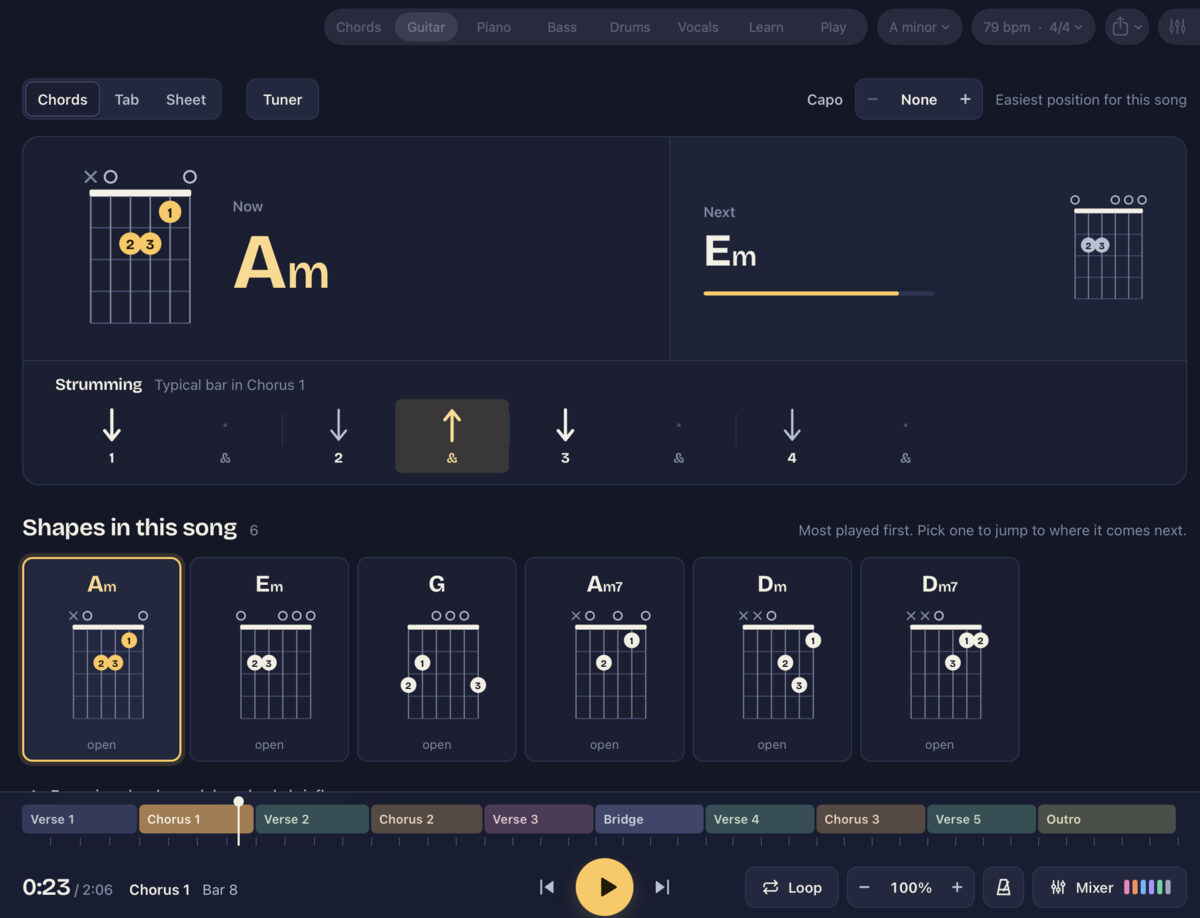
- The key. Move the song up or down by up to six semitones and the chords and the recording move together. Guitarists can use a capo instead: the Guitar view suggests the easiest position.
When you want it on paper, Print chart lays out the chords and lyrics for the music stand.
How it finds the chords
A chord is the sum of several instruments, so Pitband doesn’t read it from one stem. It separates the band, takes the notes the harmony instruments are likely playing, and chooses the chord roots across the whole song at once, so a single stray note doesn’t make the chart flicker between two chords. Then it decides each chord’s quality (major, minor, seventh, suspended and so on) and the key the song is in. It never looks a song up: everything comes from the recording.
What it gets right, and what to check
It is usually right about the progression, the key and where the changes fall. The slips are the ones a good musician might make on a first listen:
- a suspended or added-note chord heard as a plain major or minor one;
- a quick passing chord missed, or a passing note heard as a chord;
- a slash chord (C/G) written as plain C, or the other way round.
Songs with a steady pulse come out best. If the tempo drifts a lot, or the song has no clear beat, the bar lines get shakier, and the chords with them.
Finding the chords by ear
Software gets you most of the way; your ears settle the rest, and the skill is worth having anyway. To check a chord by ear:
- Find the bass note. Solo the bass, or listen to the lowest note under the chord: it is usually the chord’s root.
- Decide major or minor. Play the major and the minor chord on that root against the record; one will sit, the other will clash.
- Listen for the colour. If neither fits cleanly, try a seventh, a sus or an added note, the extensions most often missed.
- Slow it down and loop the bar so you can hear the change as many times as you need.
Correcting a chord
In Fix chords mode, click a chord and type its name, or pick the root and the type. The correction applies to that span of the song, the Guitar view shows the new shape, the piano arrangement follows, and the exports change with it. Corrected chords carry a small mark, and opening one again lets you go back to what was heard.
Questions
Can I get the chords from a YouTube link?
Yes. Paste a YouTube or SoundCloud link and Pitband downloads the recording to your Mac, then works on it there like any file.
Does it work for my own recordings?
Yes. It reads whatever you give it, so a rehearsal recording or your band’s demo works the same way as a released song.
Will it show me how to play the chords on guitar?
Yes. The Guitar view shows the shape of every chord, the strumming pattern for each section, and tab. See audio to guitar tab.
Updated .